Hi everyone, I’m facing a serious issue with FydeOS version 21 and I’m hoping someone here can help.
I’ve been using FydeOS since version 17 on the same laptop (Acer Aspire 5, Intel i5 10th gen, 20GB RAM, 500GB SSD), always in a trial boot setup with Windows 11 and Zorin OS (currently version 18). Everything worked fine until I upgraded to version 21. Now, FydeOS won’t boot and shows the following error:
error: unknown filesystem.
error: you need to load the kernel first.
Press any key to continue…
Here’s what I’ve tried so far:
Did a clean install of FydeOS after formatting the SSD. Tried booting with both rEFInd and GRUB, same error.
Reinstalled all three OSes (Windows, Zorin, FydeOS) using rEFInd, then tried again with GRUB. No success.
Manually created boot entries via Zorin and Windows, pointing to the EFI partition where FydeOS is installed. Still didn’t work.
Downloaded FydeOS again from a different source, thinking the image might be corrupted. Same result.
BIOS settings are unchanged from previous working setups (UEFI mode, secure boot off).
It’s strange because FydeOS worked perfectly on this laptop up to version 20. Only version 21 is giving me this issue. I’ve read that recent FydeOS versions changed how they handle rEFInd and root permissions—could that be related?
Has anyone else run into this problem with v21? Is there a new configuration or workaround I’m missing? Any help would be greatly appreciated!
Yes, the SSD where FydeOS is installed is divided into 3 parts: one for file backup, Zorin, and FydeOS. Windows is installed on the main SSD where the EFI directory with the boot is located.
That’s why I guess. You may try to install fydeos on the same ssd with windows and share the efi partition with windows. The efi partition should be on the same ssd.
Hey, how’s it going?I partitioned my main SSD that has Windows 11 installed and installed FydeOS on the partition where the EFI folder is, but got the same error :(Weird because I didn’t have this problem in versions 17 to 20 of FydeOS
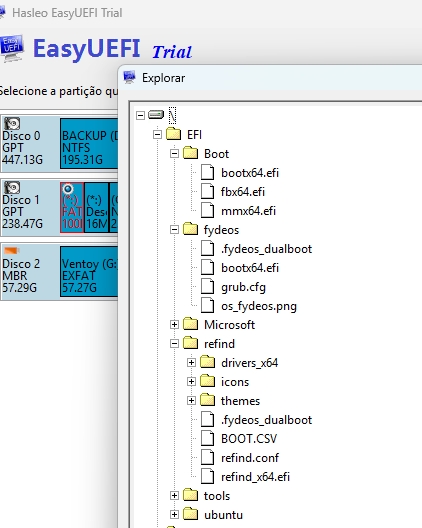
I’ve seen cases before where people couldn’t get it working despite repeated installations, and the fix was completely deleting the old bootloader files before reinstalling.
The main thing is to clear the previous ‘refind’ folder, as the old and new boot files may conflict. If it still doesn’t work after that, then I’m out of tricks — FydeOS has limited support for multiple drives, so issues may occur.
I figured out the problem!
I was using Ventoy to boot from the USB drive, but I decided to give Rufus another shot — even though I’d had issues with it before when creating the media.
This time, after days of trying, it finally worked!
Thanks so much for being willing to help. I really appreciate it — we’re in this together!
That’s why I asked earlier whether you used Ventoy — FydeOS actually doesn’t support Ventoy; it was Ventoy that announced support for FydeOS on their own. Anyway, glad it’s all sorted out! I’m happy to help others