Question Description
Have you searched the community for related issues?
- No similar issues found.
Please describe the problem you’ve encountered in detail:
- Description:
 System & Device Information
-
Hardware & System Configuration:
- Processor:
- Graphics Card(Please specify if there’s a discrete graphics card):
- RAM:
- FydeOS Version:
-
Relevant System Logs:
- Open the Chromium browser and enter
/var/log/messagesto retrieve logs. - Log Details:
- Open the Chromium browser and enter
Note: If you’ve lost your FydeOS subscription, please refer to this FAQ for assistance.
FydeOS for PC (Modern Intel), v22.0-SP1, Non-commercial Edition
Platform: 16503.20.22.14
Chromium: 144.0.7559.32
ARC: 11977712 SDK Version 33
Device build: amd64-fydeos_iris
Developer Mode: enabled
Rootfs verification: disabled
BIOS: UEFI
Android subsystem: working
Powerwash: done
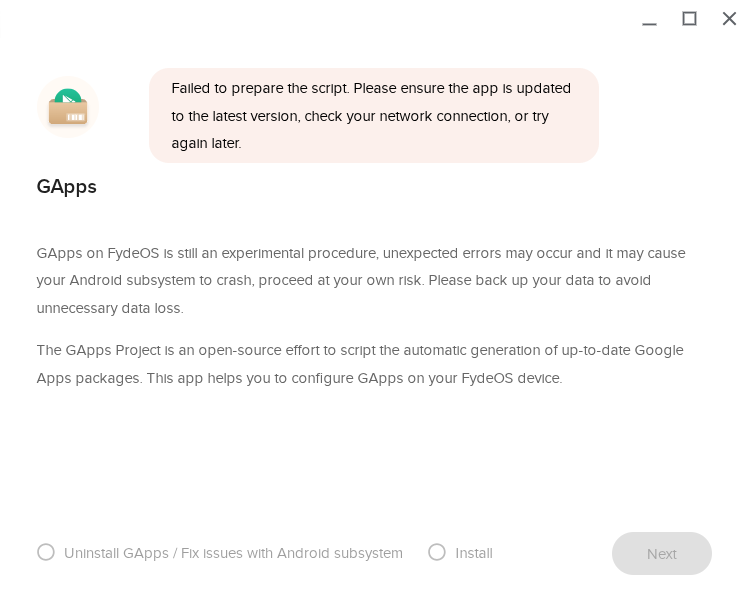
Issue: GApps Configurator shows “Failed to prepare the script. Please ensure the app is updated to the latest version, check your network connection, or try again later.”
Both Install and Uninstall/Fix options are disabled.
The same installation USB worked on another PC.