I have a Lenovo ThinkPad L490 with Intel Core i5-8265U and Intel UHD 620.
FydeOS Slim v22.1 installs and boots successfully. The FydeOS desktop and browser work perfectly.
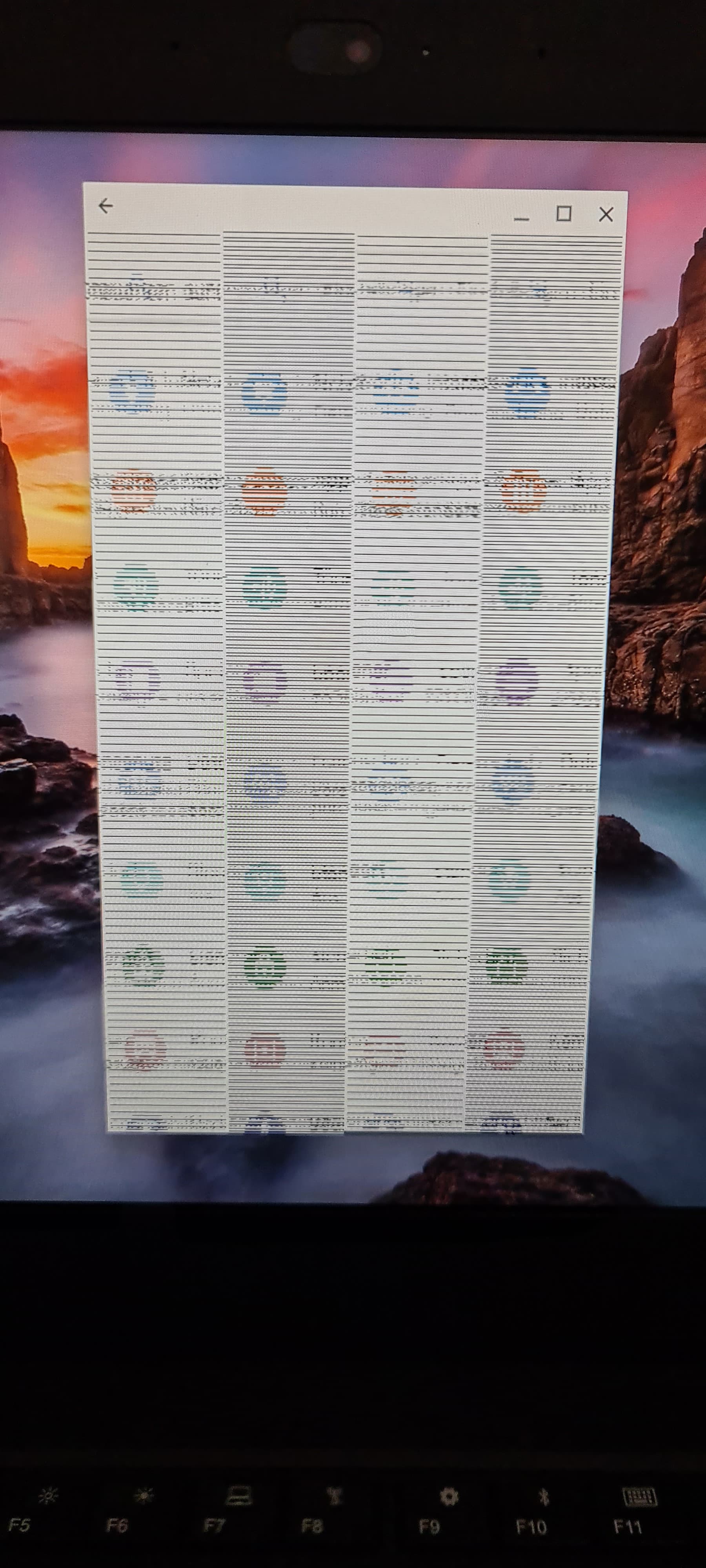
However, as soon as I open the Android subsystem or Android Launcher, the entire Android screen shows horizontal stripes and is unreadable.
I performed a clean installation twice and the problem is always the same.
I also tested FydeOS Intel Modern v20, v21 and v22.1, but these versions do not boot on my laptop. They immediately reboot before the FydeOS logo appears.
Is this a known compatibility issue? Is there a workaround or a fix?
In theory, this CPU should be using the Modern version, so that may be the cause of the issue. As for why the Modern version won’t boot, it’s difficult to determine without the serial log.
Thank you. I tested FydeOS Modern v20, v21, v22.0-SP1 and v22.1. All of them reboot immediately before the FydeOS logo appears. I can try to provide a serial log. Could you please explain how to capture the serial log on a Lenovo ThinkPad L490?
I don’t have a serial console. Is there another way to collect boot logs from the Modern version? For example, kernel logs, debug mode, or a USB log?
For most laptops, capturing logs before the operating system starts usually requires special serial/UART debugging hardware or other platform-specific debugging tools. The exact method depends on your device.
You can ask an AI assistant such as ChatGPT or Claude for guidance on your specific laptop model—they’re both excellent resources for finding the appropriate debugging method and tools.
The screen turns black immediately after selecting the USB drive. There is no GRUB menu, no Brunch menu, and no FydeOS logo. The laptop immediately reboots, so I cannot enter debug mode or change kernel parameters.
Is there a debug build of the Iris (Modern) image, or a kernel parameter that can be added to the USB image before booting?
Thank you. I don’t have a UART debugging adapter, so I can’t capture the pre-boot logs. If you have a test build or another way to debug this issue without UART, I’d be happy to test it.
Lenovo ThinkPad L490 (Intel i5-8265U / Intel UHD 620) - Possible graphics issue with FydeOS and ChromeOS!
Hello hacker
I would like to report a possible graphics-related compatibility issue on my Lenovo ThinkPad L490.
Hardware:
Lenovo ThinkPad L490
Intel Core i5-8265U (Whiskey Lake)
Intel UHD Graphics 620
16 GB RAM
BIOS 1.33
UEFI Boot
Secure Boot disabled
I tested the latest FydeOS on this laptop. FydeOS boots, but I experience graphics-related problems.
To compare the behavior, I also tested Brunch with several official ChromeOS recovery images:
Rammus
Octopus
Hatch
Nocturne
Nami (132 and 147 Beta)
All of them show very similar behavior:
Brunch boots successfully.
ChromeOS starts.
The Google or ChromeOS logo appears.
After a short time, the screen becomes completely black.
The laptop remains powered on and does not reboot.
I also tested an external monitor through HDMI, but there is no image there either.
On the same ThinkPad L490, the following operating systems work perfectly:
Windows 11
Fedora
Debian
elementary OS
Android TV / Google TV
Because both FydeOS and ChromeOS (Brunch) show very similar graphics/display problems on exactly the same hardware, I suspect they may have the same underlying cause. My current hypothesis is that it could be related to Intel UHD 620 (i915) graphics initialization or display initialization during boot.
I cannot confirm that this is the cause, but since two different ChromeOS-based systems behave similarly while standard Linux distributions work correctly, I wanted to report this observation.
Has anyone successfully used FydeOS on a ThinkPad L490 or another Whiskey Lake (Intel i5-8265U / Intel UHD 620) system?
Any suggestions, debug options or known fixes would be greatly appreciated.
I found that my ThinkPad L490 has dual graphics: Intel UHD Graphics 620 (i915) and AMD Radeon Topaz XT (amdgpu). Could this be the reason why FydeOS Modern does not boot and FydeOS Slim has graphical issues in the Android subsystem? Is there a way to disable or ignore the AMD GPU for testing?
Whether you can disable the discrete GPU depends on your specific device. Please check whether your BIOS provides an option to disable it. If not, you could try physically removing the discrete GPU (if your hardware allows it).
I’m not a member of the FydeOS team—I’m just another user—so reporting this issue to me won’t help. If you believe this is also reproducible on upstream ChromiumOS, I would recommend reporting it to Google instead.
From what you’ve described, the problem appears to be caused by the discrete GPU itself rather than a lack of support for your CPU or device in FydeOS. If that’s the case, there may not be a software workaround.
I actually asked at the very beginning whether your machine had a discrete GPU, and you said it didn’t. At this point, I don’t think there’s much more to discuss. FydeOS does not support systems with both an integrated GPU and a discrete GPU installed at the same time. It is designed to work with a single active GPU only. If your device cannot run with only one GPU enabled (either by disabling or removing the discrete GPU), then unfortunately there isn’t a workable solution.