 Question Description
Have you searched the community for related issues?
- GApps install failure – this seems to be essentially the same issue that I’m having, but the fix here was to use the legacy installer, which I wasn’t able to do (more details below)
Please describe the problem you’ve encountered in detail:
- Description:
I’m getting the error “Failed to prepare the script. Please ensure the app is updated to the latest version, check your network connection, or try again later.” when I try to run the GApps installer.
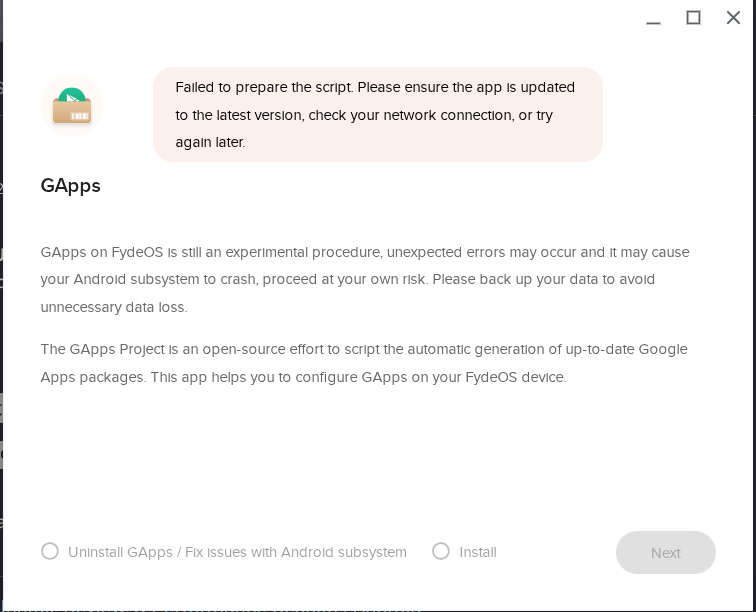
I have followed the “New GApps Configurator App” steps from the official FydeOS documentation: https://fydeos.io/help/knowledge-base/getting-started/setup/install-google-play-store/
Everything works without error, up to the point where I try to run the Configure GApps tool, which is when the failure message shows up. I’ve also tried from multiple different network locations, so I don’t believe that this is a network issue.
I’ve tried powerwashing the device twice (signed in once with a Google account, and signed in the second time with a local account) but this didn’t seem to make a difference.
I saw in the forum post that I linked above that another user was advised to use the Legacy Open GApps Configurator App.
When I was going through steps for using the Legacy method for Android 13 (since this is the version that seems to come with FydeOS v22.1), I got stuck on the downloading the ChromeOS recovery image step (Step 1.4). There is no mention of which image to download for FydeOS v22; the guide only lists steps for v19 and v20.
Let me know if anyone has any methods to get this resolved!
 System & Device Information
-
Hardware & System Configuration:
- Processor: Intel Core i7-7600U @ 2.80GHz
- Graphics Card: Built-in, non-dedicated
- RAM: 16GB
- FydeOS Version: FydeOS for PC (Modern Intel), v22.1, Non-commercial Edition
-
Relevant System Logs:
- I reviewed the logs but didn’t see anything relevant.